

You claimed your Google Business Profile, but your business on Bing Maps is unclaimed or stuck with the wrong information.
This guide walks through the new 2026 process since Microsoft moved everything from bingplace.com to bing.com/forbusiness in October 2025. Most online guides are now outdated. Any US business can do this and no marketing experience is needed.
Should I Claim My Business on Bing?
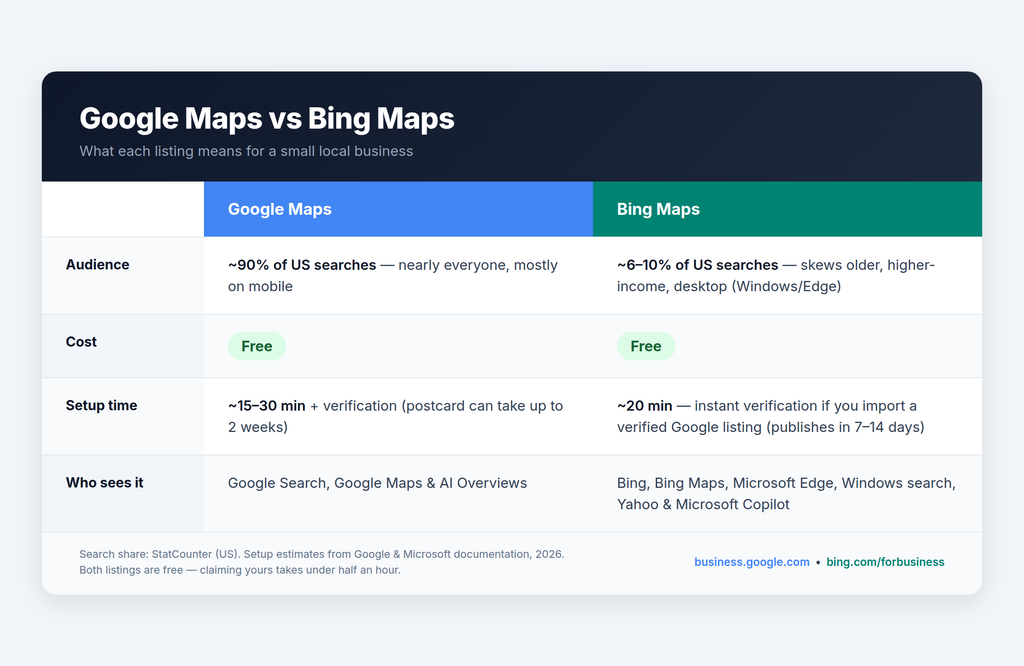
Yes: claiming your Bing Maps listing is free, takes about 20 minutes and puts your business in front of the approximately 900 million searches Bing handles every day, plus Microsoft Copilot’s AI answers. Most of your competitors haven’t done it.

Why Small Business Owners Should Not Ignore Bing Maps
Most local businesses never claim their Bing Maps listing and an unclaimed or wrong listing is a free opening for a competitor.
Here are some numbers that should matter to you:
- Bing is about 6 to 10% of US searches and that means tens of millions of local searches available to you every day
- Bing users skew older, higher-income and desktop-based, which can mean high purchase-intent for your business.
One Bing listing works across many places:
- Bing Search + Bing Maps
- Microsoft Edge and Windows Search Bar
- Yahoo (powered-by Bing)
- Microsoft Copilot and AI Answer pull local business data from Bing Places.
Remember, your listing is a citation signal: a consistent Name/Address/Phone across Google, Bing and directories reinforces trust with customers. Trust is vital for potential customers.
What is Bing Places for Business? (What Changed in 2025 – 2026)
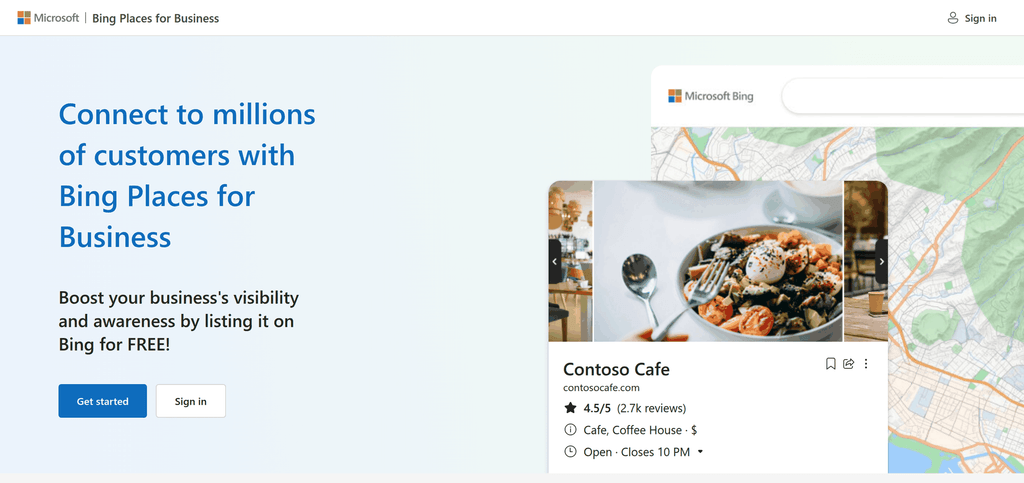
Bing Places for Business is the free version of Google Business Profile. Your Bing listing also appears in DuckDuckGo and Yahoo. Microsoft relaunched Bing Places in October 2025.
Old URL: bingplaces.com → New URL: bing.com/forbusiness
Old instructions online are now wrong.
Your Bing Places listing controls your knowledge panel information, map pin, hours, photos, reviews and more.

3 Things You Need Before You Start
1. A free Microsoft account (Outlook/Hotmail/Xbox all work)
2. Your business information, which should match your Google Business Profile exactly (Name, Address, Phone consistency)
3. Optional but fastest: a verified Google Business Profile in which to import.
💡 No verified Google listing — or locked out of one you claimed years ago? Fixing Google access first makes the Bing import instant. PaulGerst.com helps US small business owners reclaim stuck Google listings. Tell us about your business or schedule a 15-minute call.
How to Claim Your Business on Bing Maps (Step-by-Step)
Step 1: Go to bing.com/forbusiness → sign in with Microsoft account
Step 2: Choose business type (small business = 1–10 locations) + country
Step 3: Search for your business by name + city or phone number

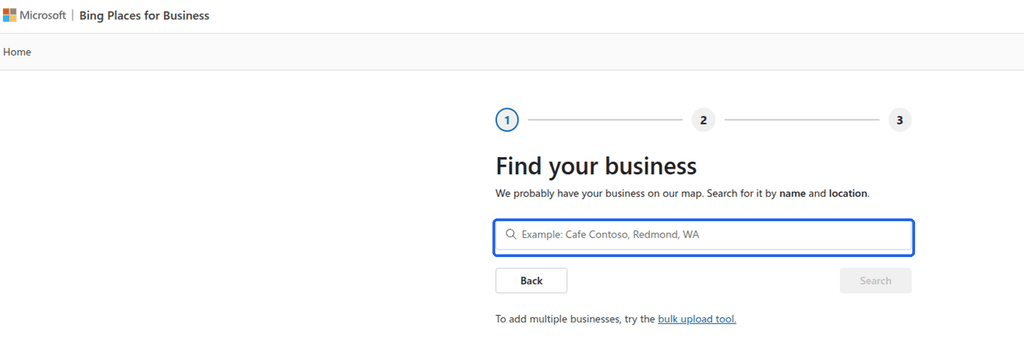
If it appears: click “Claim business”
If it doesn’t: click “My business is not listed in the search results” → Create new business
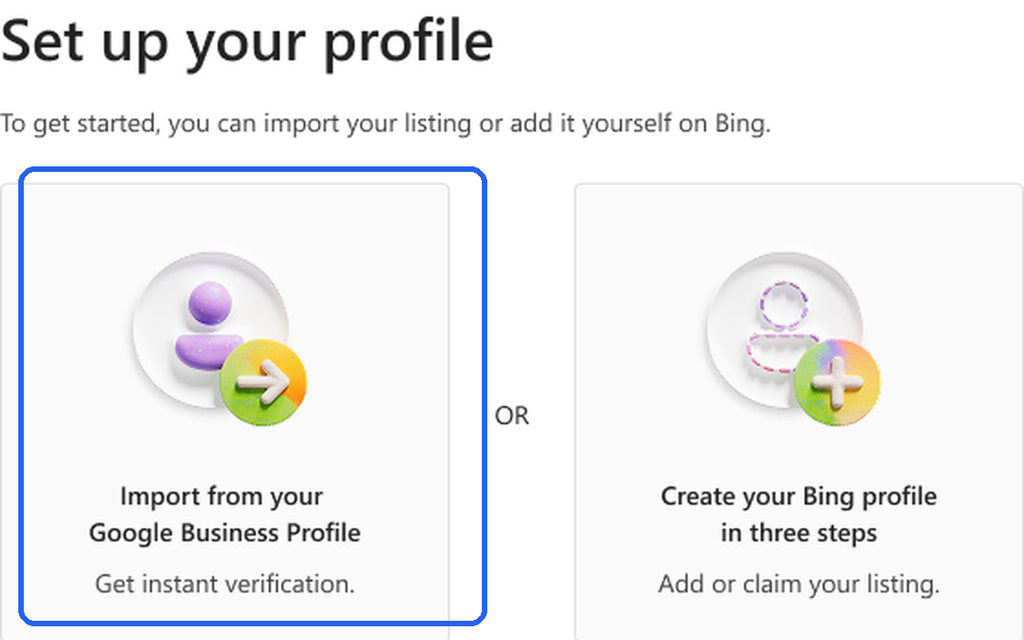
Step 4: Import from Google or enter manually
⚠️ Clarify: the Google import is a one-time copy, not a live sync — later edits on Google do NOT automatically update Bing
💡Import option missing, or it asks for a Google account you can’t sign into? That’s usually a stuck Google Business Profile — a more common problem than Bing. PaulGerst.com gets you back in. Tell us about your business or schedule a 15-minute call.

Step 5: Fill in your details
Business name = real-world name only (no city/service keywords — Bing can suspend for this)
Address (choose hide/show — hide if you’re a service-area business)
Phone, website, hours
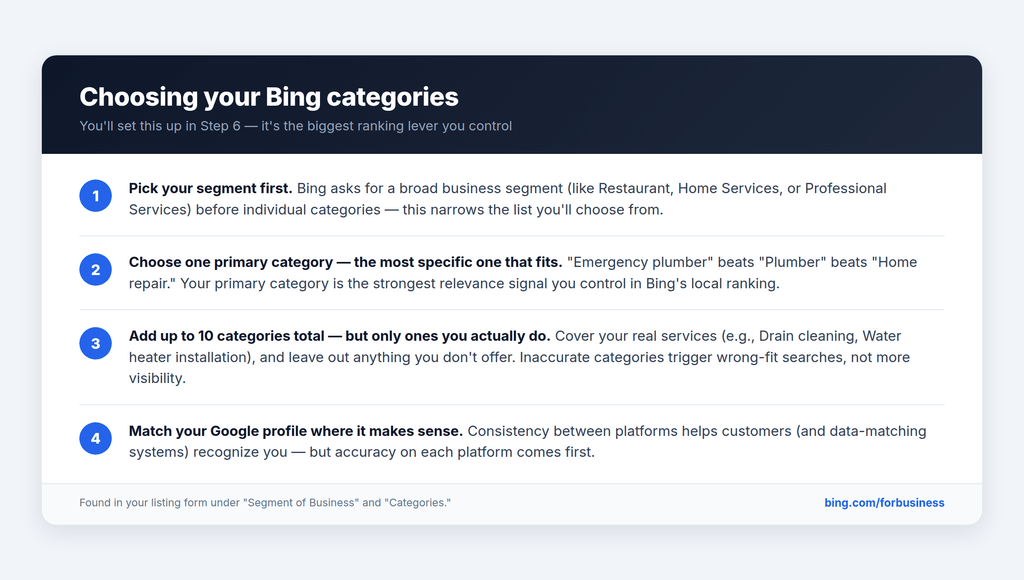
Step 6: Categories — pick a business segment first, then up to 10 categories; choose the most specific primary category

Step 7: Description (natural keywords), photos (up to 100; first photo becomes primary — use your logo; min 480×360px), social and profile links
How to Verify Your Business on Bing
Quick answer: Setting up your Bing listing takes about 20 minutes and costs nothing. Verification is instant with a Google import or up to ~2 weeks by postcard, then your listing publishes in 7–14 days.
- Total setup: ~20 minutes
- Verification: instant → 5–6 business days (postcard, US)
- Publishing: 7–14 days
- Best case: live same day. Worst case: about 4 weeks.
| Method | How Fast | Best For |
|---|---|---|
| Import verified GBP | Instant verification | Anyone with a Google listing |
| Phone call/text | Immediate–same day | Fastest manual route |
| 1–2 business days | Business email on your domain | |
| Postcard | 5–6 business days (US) | No phone/email access |
💡 Tip: If your verification PIN doesn’t work, a former agency or employee may have started the process from another Microsoft account — the PIN must be entered in that account. Microsoft says to wait at least 12 days after requesting a postcard before contacting support.
Why Isn’t My Listing Live Yet? The 7 to 14 Day Publishing Cycle
After verification (or import), Bing runs a 7 to 14 day publish cycle before you appear on Maps.

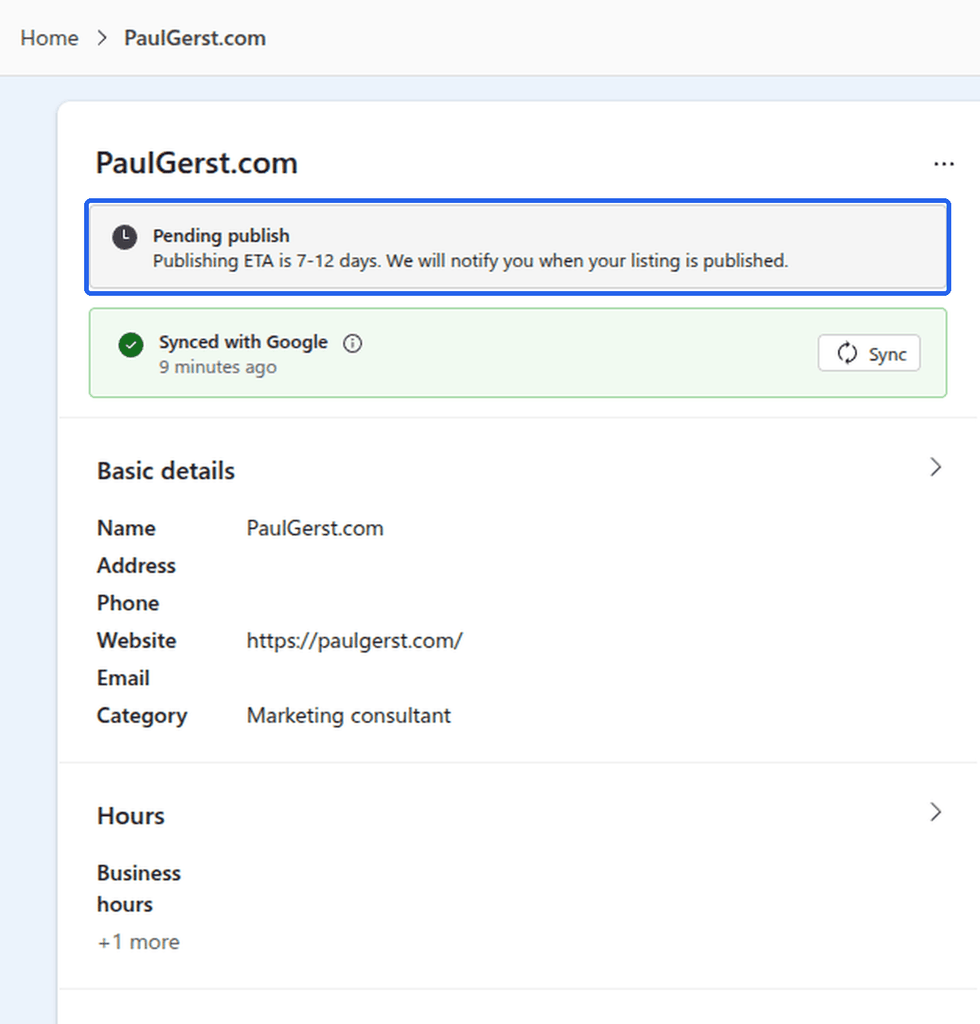
Remember, editing a pending listing resets the publish date so make all changes at once and then wait. FYI: This prevents the #1 reason owners give up.
How to Optimize Your Bing Maps Listing and Get Found Faster
Match NAP (name, address, phone) exactly to Google (for example Elm St vs Elm Street really matters). Here are other items to take action on:
- Reviews your primary category
- Add keywords naturally to the description
- Upload real photos (storefront, team, logo)
- Reviews: Bing’s “popularity” ranking factor counts reviews on Yelp, TripAdvisor, and Facebook — not just Bing
- Add your website + submit your sitemap to Bing Webmaster Tools
- Add UTM tags to your listing’s website URL so you can track Bing traffic in analytics. By doing this, you will know how much traffic is coming from Bing.
Troubleshooting: Commong Bing Maps Problems and Fixes
🔒 My Bing listing is already claimed by someone else — how do I fix it?
Request access from whoever controls it now, which is usually a former agency or employee, through Bing’s claim flow, then verify with a PIN sent to their account. If they don’t respond, contact Bing Places support with proof of ownership (business license or utility bill). Don’t create a second listing, duplicates split your ranking power.
- Search your business on Bing Maps
- Click Claim → choose “request access”
- No response in 2 weeks? → contact support with documents
The same lockout happens on Google Business Profile — old agencies, ex-employees, previous owners. PaulGerst.com specializes in getting US small business owners back into their Google listings for a flat $100 fee. Tell me about your business o schedule a 15-minute call.
👻 Why isn’t my business doesn’t show up on Bing Maps?
Check the five usual causes, in this order: unfinished verification, a wrong or overly broad primary category, duplicate listings, inconsistent NAP data, or you’re simply still inside the 7–14 day publishing cycle. Incomplete data is the most common reason Bing withholds a listing, it won’t display what it can’t fully verify.
- Log in at
bing.com/forbusinessand check your listing’s status (verified? published?) - Still “pending”? Wait out the cycle — don’t edit (edits reset the clock)
- Fill every field: specific primary category, hours, description, 5+ photos
- Compare your name/address/phone against Google and your website — fix any mismatch
- Nothing after 2+ weeks → contact Bing Places support with your listing ID
👥 There are duplicate listings for my business
Mark each duplicate “Permanently closed” using Suggest an edit on its Bing Maps result — don’t try to merge them. Duplicates split your reviews and send Bing’s ranking algorithm conflicting signals. Cleanup typically completes within 2–4 weeks of your first follow-up.
- Search your business name on Bing Maps and note every duplicate
- Claim your correct listing first (so you never close the wrong one)
- On each duplicate: Suggest an edit → Permanently closed
- Add a short note pointing searchers to your main listing
- Recheck in 2–4 weeks; submit once more if it’s still there
📦 My business moved — should I edit the old listing?
No: don’t edit the old listing’s address. Microsoft’s own guidance is to create a new listing at your new address, verify it, then mark the old one permanently closed. Editing an established address can suppress your listing; a fresh one publishes through the normal 7–14 day cycle.
- Create + verify a new listing at the new address
- Old listing → Suggest an edit → Permanently closed
- Update Google, your website, and key directories the same day so NAP stays consistent everywhere
⚠️ Watch out: if your listing is still pending publication, any edit resets your publish date — make all changes in one pass, then wait.
🏢 I have more than 10 locations
The single-location claim flow stops at 10 locations. Instead, register as a chain business and upload every location in a spreadsheet, and bulk-verify. Microsoft reviews chain requests in about 5–7 business days before releasing the template.
- Go to
bing.com/forbusiness→ Chain business (more than 10 locations) - Submit chain name, website, location count, and corporate contact
- Wait for Microsoft’s review (~5–7 business days) → receive the spreadsheet template
- Fill in all locations → upload → run bulk verification
- Listings publish in the usual 7–14 days after verification
How Long Does Bing Verification Take?
- Setup: ~20 minutes
- Verification: instant (GBP import) to 14 days (postcard)
- Publishing: 7–14 days
- Total best case: same day. Total worst case: ~4 weeks.
Is Bing Places for Busines free?
Yes — Bing Places for Business is completely free. Microsoft charges nothing to claim, verify, or manage your listing, and there’s no paid tier or credit card required. You get the full listing — photos, categories, hours, and basic performance analytics — at no cost. The only investment is your time: about 20 minutes, or less if you import your verified Google Business Profile.
Should I claim my business on Bing if I’am already on Google
Yes — your Google listing does not carry over to Bing; the two are completely separate databases. Claiming on Bing takes about 20 minutes, is free, and becomes nearly instant if you import your verified Google profile. It puts your business in front of Bing, Microsoft Edge, Windows search, and Microsoft Copilot users who would otherwise never see you — an audience most of your local competitors ignore.
Does Bing Places sync with Google Business Profile?
No — not automatically. You can import your Google Business Profile during setup, which copies your details over in one pass and earns instant verification, but after that the two listings are completely separate. Changes you make on Google — hours, photos, phone number — will not update your Bing listing; you have to edit both, or re-run the import periodically.
How long does Bing Places verification take
It depends on the method you choose: importing your verified Google listing is instant, phone verification is usually immediate, email takes 1–2 business days, and a postcard takes about 5–6 business days in the US. After verifying, your listing still goes through a 7–14 day publishing cycle before it appears on Bing Maps. Best case, you’re live the same day; worst case, about four weeks from start to finish.
Does a Bing listing help my Google ranking?
Not directly — Google and Bing are separate systems, and Google doesn’t look at your Bing listing when ranking your Google Business Profile or Map Pack. The benefit is indirect: Bing Places is a high-authority citation, and keeping your name, address, and phone number identical across Google, Bing, and other directories strengthens the consistency signals that all search engines use to trust a local business. Claim Bing for the Bing audience and a cleaner citation profile — not as a shortcut to Google rankings.
Does Microsoft Copilot use Bing Places data?
Yes — Microsoft Copilot pulls local business information from Bing’s data, including Bing Places listings, when people ask it for local recommendations inside Edge, Windows, or the Copilot app. If your listing is unclaimed or outdated, Copilot can repeat wrong hours or phone numbers — or point searchers to a competitor instead. Claiming your Bing listing is quickly becoming the way you keep your business accurate in AI answers, not just in search results.
What happened to bingplaces.com?
Microsoft relaunched Bing Places for Business in October 2025 and moved it from bingplaces.com to bing.com/forbusiness. Existing accounts and listings were migrated automatically, and the old address now redirects — nothing was lost. Many older tutorials still reference bingplaces.com, but bing.com/forbusiness is the only current home for claiming and managing your listing.
Can I hide my address on Bing Maps if I serve customers at their location?
Yes — if you go to your customers instead of them coming to you (plumbers, electricians, cleaners, mobile services), you can hide your street address during setup, just like on Google Business Profile. Bing will display only your city and ZIP code, and you should still add your service areas so you appear in searches for the towns you cover. Only show a full address if customers can actually visit it.
Recap: 20 minutes of work, free, unlocks Bing + Edge + Copilot visibility
- Natural tie to your business: “Claiming Bing is straightforward — getting locked out of your Google Business Profile is the harder problem. If you’ve lost access to your Google listing, [service name] gets it back. Grab our free [checklist/audit] →”
- Soft CTA: invite comment/question
Claiming your Bing listing is 20 minutes of straightforward work. Getting locked out of your Google Business Profile is the harder problem — and the one that quietly costs you customers. PaulGerst.com helps US small business owners reclaim their Google listings for a flat $100 fee. Questions about your listing? Send your questions to us.